We reported a few months ago that Heroes of Newerth is Free to Play on Garena.
If you are from the Philippines, Malaysia, Singapore or Vietnam, you can play HoN for free.
What must you do to be able to play HoN on Garena?
1) First you need a Garena Heroes of Newerth beta key so you can play Garena HoN.
To get a free GarenaHoN beta key, you need to become a Gold Member.
*You can also buy a Garena Prepaid card.
2) Register and activate your account.
Source: Read the Garena HoN Gold Member Beta Key Guide3) Download Garena Messenger (Garena messenger includes the HoN installer file)
4) Double Click the file entitled Garena-HoN_setup.exe to install the Garena Messenger and Garena Heroes of Newerth.
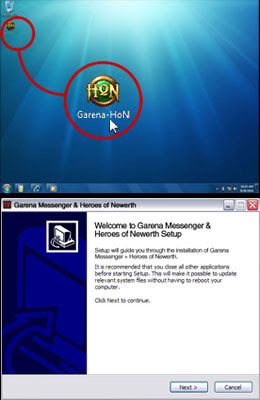
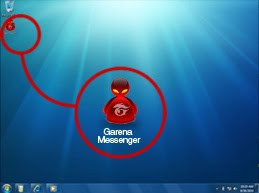
5) After Garena Messenger has been installed (with GarenaHoN), double click on the mean-looking Garena Messenger icon.
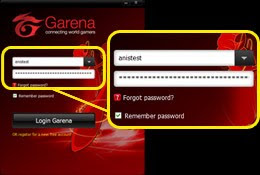
6) Enter your Garena username and password.
*Please remember never to share your accounts with anyone to avoid stolen accounts.
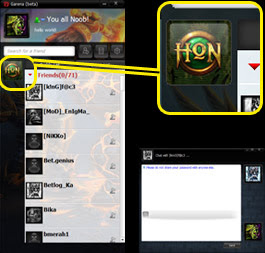
7) You are now inside the Garena Messenger. Click on the HoN icon to start playing.
Have you encountered any problems while following these steps?
If yes, please add a comment so I can help you sort it out.
Garena Philippines has had a long problem with cafe users who have been stuck using the old Warcraft TFT 1.20e patch. But just recently, the administration of PH Garena have finally turned hard line by mandating that the latest Warcraft Frozen Throne patches should be used.
Since DotA AllStars has updated to DotA v6.60, it is only natural for Garena to use the latest patches released by Blizzard Entertainment to minimize maphacks, cheats, bugs, and collided DotA maps.
So if you are from the Philippines and wonder why you cannot see any hosted/created games or maps on your Warcraft LAN games, then you must be using an old and obsolete Warcraft patch.
To fix this problem, just update your Warcraft III: The Frozen Throne version.
Download the Warcraft Version Switcher now.
I will be posting patch installation guides as soon as possible.
How to install the Garena Fufu Ninja Skin
Log-In Screen
What's the inside look:
Steps on how to do it:
First is to Download the file at:
http://www.sendspace.com/file/6xq818
How to install:
1)Extract the file and copy
2)Next is ti Go to:
Program Files > Garena > Skin
3)Delete the current skin.ggz on the Skin folder
4)Paste this file called Skin.ggz
START GARENA and voila!
If you encounter any problems, just post about it here and I'll answer.
Garena AFK maps
Let's face it. They don't really give as much EXP as you'd hope.
The secret to level up in our clan is a map called Fufu Ninja
You can download it at http://epicwar.com/maps/66879/
It's better than AFK maps since Fufu Ninja has more exp than the Afk maps.
Plus if you're bored with AFKing, you can join the fun by playing the map.
It does not lag too.
So to all those playing AFK maps, stop doing it.
It does not give huge exp. If you want EXP - play Fufu Ninja
Search Google.
Sources: Our experiences and by the people who have level 40 accounts or higher
 Click on the Panda if you're not convinced.
It's pretty simple.
Since the time that CounterStrike EXP was lowered on garena.com, the only good alternatives are:
a) playing COD4
b) Playing a WARCRAFT (the Frozen throne) custom map called Fufu United Ninja AllStars
all you need is to host the game with 12 players and click 50 kills
Games finish around 6-7 minutes, repeat process for as much as you want
See your EXP boost like crazy
Tried and tested
Proven by a lot of level 50 accounts
Download the map at www.getfufu.co.nr or www.fufuportal.blogspot.com
More mirrors at:
http://epicwar.com/maps/66879/ If you have more tips and tricks, feel free to comment.

